

CabinetViewer 3D
Parametric 3D furniture visualizer, custom Web Component architecture, and real-time WebGL rendering
 Three.js
 WebGL
WebGL JavaScript
 HTML5 Canvas
 CSS3 Grid
// Interactive 3D WebGL Configurator & Controls
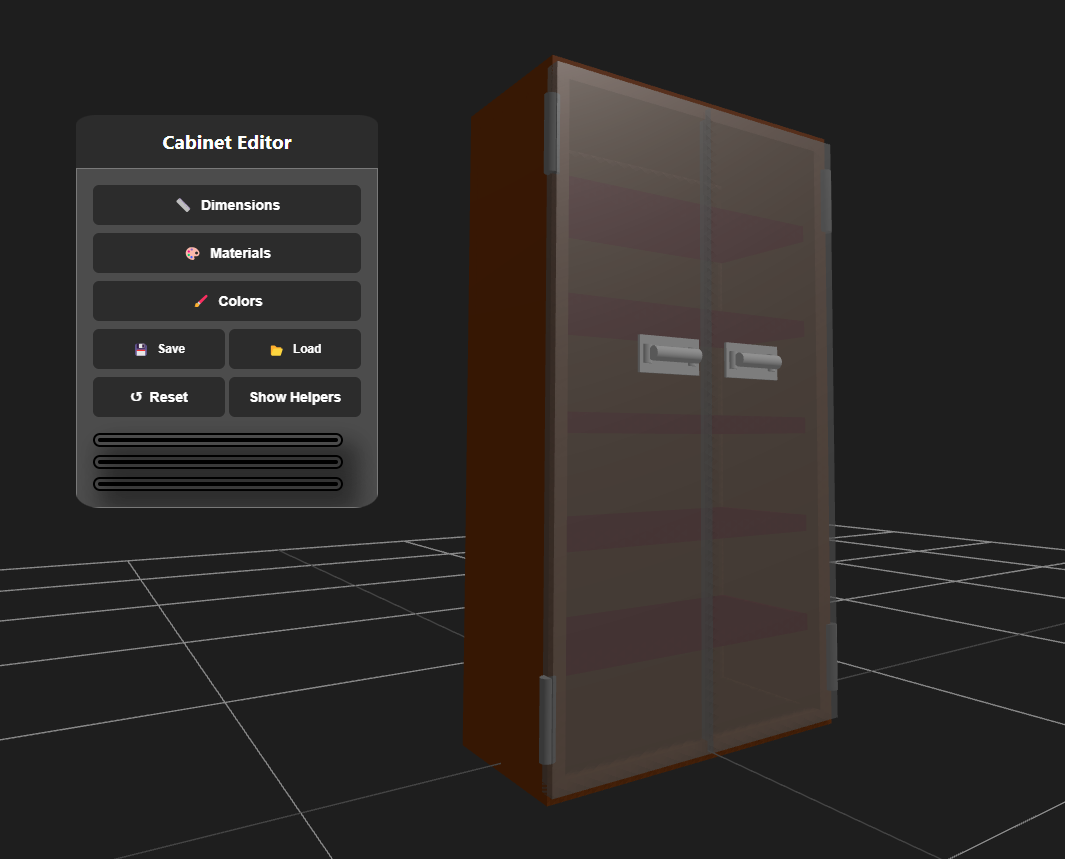
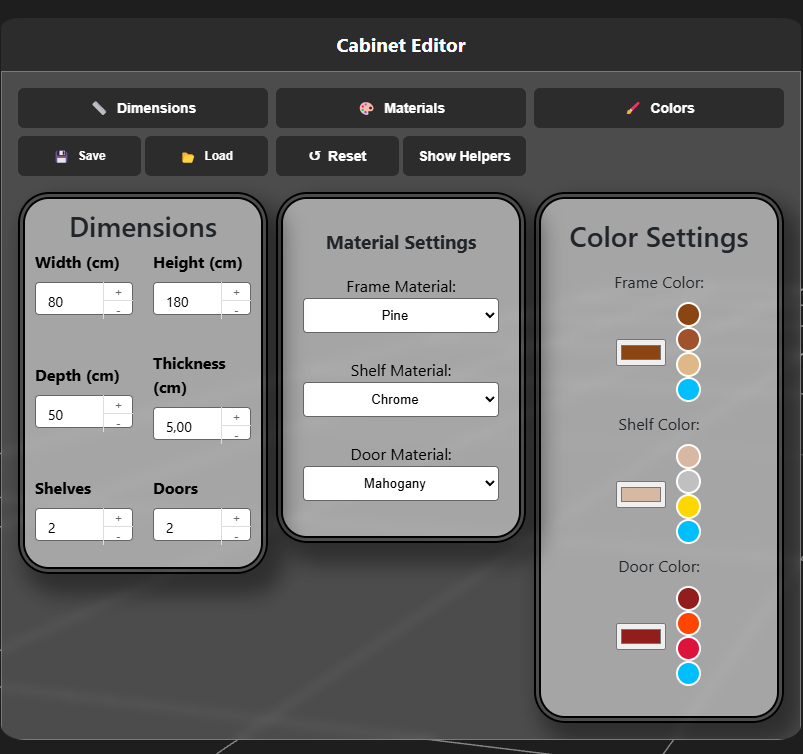
Project overview
CabinetViewer 3D is a modular, interactive 3D web application designed for parametric furniture visualization and real-time configuration.
Built using Three.js and vanilla ES6 JavaScript Web Components without heavy frontend framework overhead, the application allows users to modify cabinet dimensions, swap physically based materials, adjust shelf distributions, and animate doors with 60 FPS viewport rendering.
System architecture
The application is structured into decoupled components communicating over a centralized event bus:
| Component | Responsibility | Technical implementation |
|---|---|---|
| Viewport controller | Scene and camera management | Three.js WebGLRenderer, PerspectiveCamera, and smooth OrbitControls with damping |
| Parametric mesh generator | Dynamic 3D geometry | Computes vertex buffers on the fly when dimension sliders change, avoiding static model downloads |
| Hinge animation system | Door pivot kinematics | Raycasts mouse clicks onto door meshes and applies trigonometric rotation around offset pivot axes |
| Material pipeline | Surface appearance | Configures PBR materials (roughness, metalness, normal maps) for wood veneers, laminates, and brushed metals |
| Draggable UI widget | Floating control panel | Custom HTML5 draggable panel with real-time sliders, color pickers, and preset buttons |
| Configuration exporter | State persistence | Serializes dimensional parameters and material states into JSON for export and localStorage caching |
Technical implementation details
1. Parametric geometry generation and UV mapping
Rather than loading static .gltf or .obj models, CabinetViewer generates its box geometries programmatically. When dimensions change, vertex buffers and UV coordinates recalculate to prevent texture stretching on wood grain maps:
View JavaScript implementation: createParametricPanel
export function createParametricPanel(width, height, depth, textureScale = 1.0) {
  const geometry = new THREE.BoxGeometry(width, height, depth);
  const uvAttribute = geometry.attributes.uv;

  // Recalculate UV mapping based on physical dimensions to prevent texture stretching
  for (let i = 0; i < uvAttribute.count; i++) {
    const u = uvAttribute.getX(i);
    const v = uvAttribute.getY(i);

    // Scale UVs according to physical aspect ratio
    uvAttribute.setXY(i, u * (width / textureScale), v * (height / textureScale));
  }

  geometry.computeVertexNormals();
  uvAttribute.needsUpdate = true;
  return geometry;
}
2. Animated door pivot mechanics
Standard Three.js rotation occurs around the object’s center of mass. To achieve realistic door swings, the application positions a pivot anchor at the outer hinge edge of the frame:
View JavaScript implementation: CabinetDoor hinge kinematics
export class CabinetDoor {
  constructor(scene, width, height, thickness, hingeSide = 'left') {
    this.pivot = new THREE.Group();
    this.isOpen = false;
    this.targetAngle = 0;
    this.currentAngle = 0;

    const doorGeometry = new THREE.BoxGeometry(width, height, thickness);
    // Offset door mesh so rotation occurs around hinge edge
    const offsetX = hingeSide === 'left' ? width / 2 : -width / 2;
    doorGeometry.translate(offsetX, 0, thickness / 2);

    this.mesh = new THREE.Mesh(doorGeometry, createWoodMaterial());
    this.mesh.userData.parentDoor = this;
    this.pivot.add(this.mesh);
    scene.add(this.pivot);
  }

  toggle() {
    this.isOpen = !this.isOpen;
    this.targetAngle = this.isOpen ? (Math.PI / 180) * 105 : 0;
  }

  update(deltaTime) {
    if (Math.abs(this.currentAngle - this.targetAngle) > 0.001) {
      this.currentAngle = THREE.MathUtils.lerp(this.currentAngle, this.targetAngle, deltaTime * 8);
      this.pivot.rotation.y = this.currentAngle;
    }
  }
}
3. Modular ES6 Web Component architecture
The configuration widgets and draggable control panels are encapsulated as autonomous custom elements. UI controls emit custom events over a shared event bus (cabinet:dimension-changed, cabinet:material-changed), keeping DOM manipulation completely decoupled from the WebGL render loop.
4. Physically based material rendering (PBR)
The scene utilizes Three.js MeshStandardMaterial with configurable roughness and metalness maps. An ambient light combined with a key directional light casting soft PCF shadow maps provides realistic surface highlights across oak, walnut, matte laminate, and brushed aluminum presets.